Introduction
Today, I’m not here to talk about SBOM scoring, compliance, NTIA , or anything as usual. Instead, I want to highlight a completely different, but very real SBOM use case.
This isn’t a theoritical problem, it straight came out from a Redit thread: https://www.reddit.com/r/sysadmin/comments/1p1xegu/how_to_verify_vulnerability_deltas_between/
Reddit issue (simplified)
I compared hardened base images with their official upstream images. Theoretically, CVEs should drop…. but scanner results don’t always match reality.
The user ran Vulnerability scanner on both images and observed that:
- Some vulnerabilities are silently fixed via backports, but scanners still flag them.
- Some vulnerabilities disappear in hardened images… but only because the package was removed, not patched.
- Some CVEs looked “fixed” in hardened… but were actually new packages introduced with fresh vulnerabilities.
And the legitmate question arises is:
“How to objectively measure delta between a hardened image and the upstream one?"
So let’s break down these 3 actual problems that Redit user faced:
1. Scanner False Positives (Backports)
First of all, many Linux distros like Ubuntu, Debian, Alpine, and RHEL often fix vulnerabilities through backport patches without updating the package version. And this is where scanners gets confused. Since the scanner typically only see the upstream version, not the fact that you’re running a backported, security-patched version from your distribution, therefore the scanner flag it vulnerable, even though the distro has already patched it via backport. So the CVE shows up in your scan, but in reality, it’s already fixed. That’s how false positives happen.
From Red Hat’s official documentation:
RedHat backport security fixes to older version of software…
2. Package Removal / Package Suppression
Second thing is, hardened images usually remove unnecessary packages to shrink the attack surface as well to reduce image size. When a package disappears, and all of it’s associated CVE disaapear too, but that doesn’t mean anything was fixed. Nothing was patched; the package simple isn’t there anymore.
This is why raw numbers become confusing. You can’t tell:
- Did CVEs drop because packages dropped in hardened?
- Did CVEs increased because hardened image introduced new packages?
- Did anything actualy get patched?
At the end, simply looking at the CVE numbers, you don’t have have any visibility into the package-level changes.Without that context/visibility, the numbers basically seems to be noise.
3. Raw CVE counts(could be misleading)
Third thing is, raw CVE counts or CVE numbers that you get from vulnerability scanners which tells you nothing about the actual reason behind those numbers.
Upstream: 20 CVEs
Hardened: 50 CVEs
or
Upstream: 70 CVEs
Hardened: 20 CVEs
You still don’t know:
- Did CVEs disappear because certain packages were removed?
- Did new CVEs appear because hardened image added new packages?
- Which CVEs are truly common between both images?
- How many CVEs are just scanner false positives caused by backports?
This missing context is exactly why CVE totals/numbers/counts create more confusion than clarity. Without knowing why the numbers changed, people naturally end up asking:
“Why does my hardened image have MORE CVEs than upstream??”
And the opposite happens too. When the numbers drop without explanation, the question becomes:
“Why does the hardened image have fewer CVEs, what actually caused the drop?”
So… what is the correct solution?
One of the most upvoted responses on Redit said:
**Don’t compare direct scanner outputs.
- Compare the real package state.
- Build SBOMs, map package → CVE,
- use distro security trackers, and then compute the delta.**
So let’s unpack why this approach works and why it solves every Reddit issue we discussed.
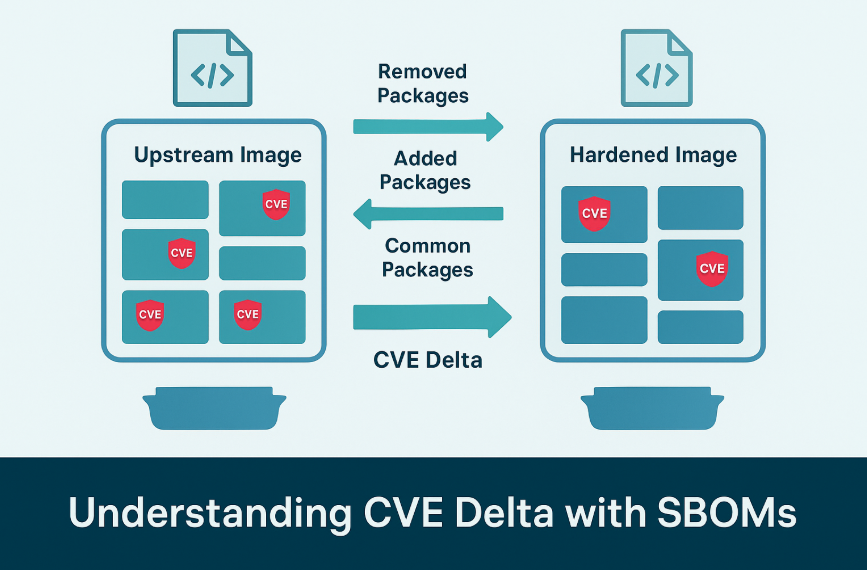
1. SBOM solves package difference problem
SBOM == the real list of installed software(components + versions + purls)
When you diff two SBOMs, you know exactly:
Packages removed:
- All CVEs attached to these packages should disappear
- This explains “CVE dropped because package vanished”
Packages added:
- New CVEs may appear
- This explains “CVE increased because new package introduced a vulnerability”
Packages unchanged:
- CVEs should match 1:1 unless backports are involved
Something like this:
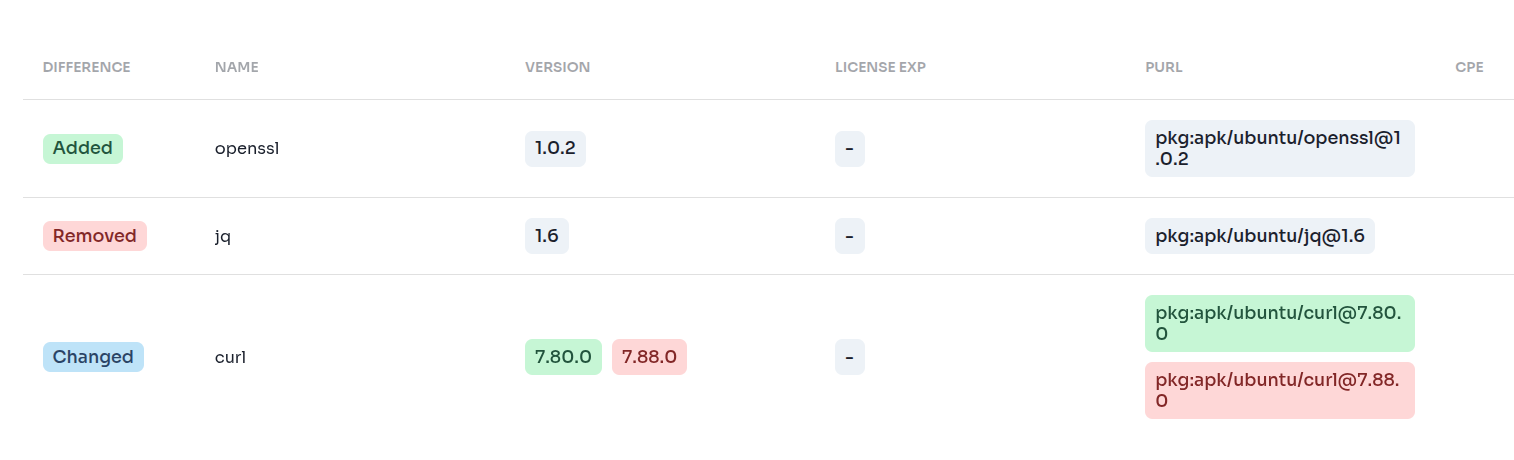
Without an SBOM, none of this is visible. You’d see CVE numbers move up or down, but you’d have no idea which packages changed, or why the numbers shifted.
2. Vulnerability Scanner Results(which package has which CVE?)
Basically the vulnerability scanner results tells you which package is tied to which CVEs.
But here is the interesting part:
- SBOM doesn’t know anything about vulnerabilities/CVEs.
- Scanner doesn’t know anything about package differences b/w 2 images.
But together, makes lot’s of sense…. SBOM (packages) + Scanner (CVEs) = full context
Now you can finally answer:
- CVEs disappeared → because the package was removed
- CVEs increased → because a new package was introduced
- CVEs remained → because the same package exists in both
- CVEs differ → because the patch level changed
- CVEs flagged incorrectly → because the distro applied backports that scanners can’t see
3. Backport Fixes(The missing piece)
Backports are where scanners are wrong most often. How do you detect them?
Two ways:
- Provide a backport vulnerability report file
- Connect with query vendor security tracker db
In the latest blog from RedHat Developer on “How to reduce false positives in security scans” using SBOM. This is really interesting scenario and use case of SBOM.
Revisit on why this solution work
By this point, we’ve looked at the individual pieces (SBOMs, scanners, backports). Now lets step back and see how everything connects.
Once you have:
- SBOM(upstream)
- SBOM(hardened)
- CVEs(upstream)
- CVEs(hardened)
- Backport fixes (optional)
…you finally have enough information to compute the complete vulnerability delta the Reddit user was looking for.
1. Package Difference(explains why CVEs appear or disappear)
| Impact | Meaning |
|---|---|
| Packages removed | CVEs disappear with them |
| Packages added | New CVEs appear |
| Packages common | CVEs should match unless patch levels differ |
2. CVE Difference(the actual vulnerability delta)
| Status | Meaning |
|---|---|
| ONLY_UPSTREAM | CVEs eliminated (package removed or patched) |
| ONLY_HARDENED | New vulnerabilities introduced |
| BOTH_SAME_SEVERITY | Unchanged vulnerabilities |
| BOTH_DIFF_SEVERITY | Patched or severity changed |
3. Backport Fixes
When you see:
Scanner says: vulnerable
Tracker/SBOM says: patched
That’s a false positive caused by backports.
Ok, that looks to be great… But, Is there a tool that already implement all these colution into it ? Well… there wasn’t. So we built one, sbomdelta.
sbomdelta
A small, practical CLI that implements the full Reddit-recommended method:
- Compares SBOM(upstream) vs SBOM(hardened)
- Maps package → CVE using your scanner output
- Detects packages removed, added, and common
- Explains CVE reduction due to package removal
- Explains CVE increase due to new packages
- Identifies common CVEs shared across images
- Supports backport-fix exceptions (optional today, real-time tracker integration later)
Github Repo: https://github.com/interlynk-io/sbomdelta
In other words:
Instead of just telling you “Hardened has 50 CVEs”: sbomdelta tells you why.
It transforms a confusing black-box CVE count into a clear, fully explained delta:
- Which CVEs disappeared and why?
- Which CVEs appeared and why?
- Which CVEs remained, and where?
- Which CVEs were false positives?
This is the missing observability layer between hardened and upstream images in the scanner result, and it finally answers the exact question raised in the Reddit post.
Hands-on with sbomdelta
Now you understand the why, let’s walk through the how to use tool sbomdelta. We’ll use Syft to generate SBOMs, Trivy to generate vulnerability reports, and then feed everything into sbomdelta eval. For a practical demonstration, let’s compare:
- Upstream image: ubuntu:22.04
- Hardened image: cgr.dev/chainguard/wolfi-base:latest
Chainguard images are perfect for testing because they aggressively remove packages and apply extensive hardening.
1. Generate SBOMs for both Images
We’ll use syft:
syft ubuntu:22.04 -o cyclonedx-json > upstream-sbom.cdx.json

syft cgr.dev/chainguard/wolfi-base:latest -o cyclonedx-json > hardened-sbom.cdx.json
What this gives us:
upstream-sbom.cdx.json→ list of ALL packages inside Ubuntuhardened-sbom.cdx.json→ list of ALL packages inside Chainguard Wolfi base image
Because SBOMs represent the true, installed package inventory, this allows perfect package-level diffing.
2. Generate vulnerability reports for both Images
You can scan either:
- the image directly, or
- the SBOM itself
Both are acceptable. We will scan the images to keep it simple: We’ll scan the images to keep it simple:
trivy image -q --format json --scanners vuln ubuntu:22.04 > upstream-vuln.trivy.json

trivy image -q --format json --scanners vuln cgr.dev/chainguard/wolfi-base:latest > hardened-vuln.trivy.json
This gives:
upstream-vuln.trivy.json→ CVEs for Ubuntuhardened-vuln.trivy.json→ CVEs for Wolfi base
3. Run sbomdelta
sbomdelta eval \
--up-sbom=upstream-sbom.cdx.json \
--hd-sbom=hardened-sbom.cdx.json \
--up-vuln=hardened-vuln.trivy.json \
--hd-vuln=hardened-vuln.trivy.json
And the o/p is:
=== Raw Vulnerability Counts ===
  Upstream total CVEs:   3
  Hardened total CVEs:   3

=== Package Delta (What Actually Changed) ===
  Packages removed in hardened: 2
  Packages added in hardened:   2
  Packages common in both:      1

=== Impact of Package Changes on CVEs ===
  CVEs removed because packages disappeared: 2
  CVEs added because packages appeared:      2
  CVEs on common packages:                   1

=== CVE Delta (Root-Cause Breakdown) ===
  Only in upstream:  2
  Only in hardened:  2
  Present in both:   1
  High/Crit removed: 1
  High/Crit added:   1

=== Vulnerability Delta Detail ===
PACKAGE@VERSION                          CVE                STATUS                 UPSTREAM   HARDENED
---------------------------------------------------------------------------------------------------------
curl@7.80.0                              CVE-2024-2222      ONLY_UPSTREAM          MEDIUM     -
curl@7.88.0                              CVE-2024-2222      ONLY_HARDENED          -          LOW
jq@1.6                                   CVE-2024-4444      ONLY_HARDENED          -          HIGH
openssl@1.0.2                            CVE-2024-1111      ONLY_UPSTREAM          HIGH       -
zlib@1.2.11                              CVE-2024-3333      BOTH_SAME_SEVERITY     LOW        LOW
Conclusion
Most teams compare CVEs using just scanner outputs, and that’s where the confusion begins. Scanners don’t understand:
- package removal
- distro backport patches
- new packages introduced by hardened images
- or why CVE counts go up or down
Without this context, CVE numbers become noise.
But once you bring SBOMs into the picture, and combine them with scanner data, everything becomes clear. SBOM tells you what changed, the scanner tells you what’s vulnerable, and sbomdelta connects the dots to tell you why.
That’s the missing layer of visibility between upstream and hardened images.
So next time someone asks:
“Why does our hardened image show more/less CVEs than upstream?”
You don’t need to guess. You can explain every single change with absolute confidence.
And that’s exactly why we built sbomdelta, to turn confusing CVE comparisons into a clean, understandable delta that teams can trust.